

OScope
The open source memecoin terminal for Solana.
Live Pulse, a trade firehose, charts, holders, wallet trackers and paper trading.
It runs on your own computer. No account, no wallet, no keys, no fees.
Website · X · Start with your AI · Safety · Verify with AI · For AI agents






Trailer with sound: latest release
Start it with your AI
You do not need to code. Paste the prompt below into your AI. It checks that the code is safe, installs everything and starts OScope. A couple of minutes later trades are flowing on your screen.
- Best: an AI that can run commands on your computer, like Claude Code, Codex, Cursor, Windsurf or Gemini CLI. It does every step itself.
- Also works: a chat app like Claude, ChatGPT or Gemini. It gives you one command at a time and you paste back what you see.
I want to run OScope, an open source memecoin terminal for Solana, on my computer.
The code is here: https://git.oscope.trade/oscope

STEP 1. SAFETY CHECK. Do this before you install or run anything.

Get the code (git clone https://git.oscope.trade/oscope.git) or read it in the browser. Do not run it yet.
If you cannot run commands, read https://git.oscope.trade/oscope/ai.txt: every text file of the project in one page.
Read every file in src/, tools/ and public/js/, and also package.json, package-lock.json and .npmrc.
Then tell me in plain words:

1. Does it ever ask for, read, store or send a private key, a seed phrase or a wallet file?
   Can it sign or send a transaction?
2. Every internet address it connects to, and what for.
3. Does it read or write any file outside its own folder?
4. Does anything run at install time (install scripts in package.json, in its dependencies, in .npmrc)?
   How many dependencies does it have and what are they?
5. Does it only listen on my own computer (127.0.0.1) unless I change that?
6. Is anything hidden: scrambled code, encoded text, code downloaded at run time, eval?

Compare what you found with SAFETY.md in the same repository. That file is the project's own list of what
the code does and does not do. If the code does anything SAFETY.md does not say, or anything looks wrong
or unclear, STOP and tell me. Do not go on until I say so.

STEP 2. INSTALL AND START. Only if step 1 was clean.

1. Run `node -v`. OScope needs Node.js 18.17 or newer (20 or newer is best). If Node.js is missing or too
   old, help me install the current LTS version from https://nodejs.org the normal way for my system.
2. In the oscope folder run `npm ci`. It installs exactly what package-lock.json pins: ws, lightweight-charts
   and fancy-canvas (a helper lightweight-charts needs). Nothing else.
3. Run `npm run doctor`. It checks everything OScope needs. Fix whatever it reports.
4. Run `npm start` and leave it running. It prints the address to open, normally http://localhost:3000,
   and every 15 seconds a line with how many trades came in.
5. Tell me the address. Tell me that I should see new coins appear on the Pulse page and trades flowing
   on the Firehose page within a few seconds.

If you cannot run commands on my computer, give me one step at a time, tell me exactly what to type and
wait for me to paste the result.
If a step fails, read AGENTS.md in the repository (it has a troubleshooting list), fix it, and tell me
what you changed.
We want you to feel safe
Never run code from the internet because a README says it is fine. That is how wallets get drained. So the prompt makes your AI read the code first and tell you what it does, before anything is installed, and stop if anything looks off. What it will find:
| Check | Result |
|---|---|
| No keys, ever | OScope never asks for a private key, a seed phrase or a wallet file, and cannot sign or send a transaction. Trading is paper trading: practice money that lives in your browser. |
| Your computer only | The server listens on 127.0.0.1. Nobody on the internet, and no other website open in your browser, can reach it. |
| Public data only | It reads a public trade stream, public SOL price pages and the pictures of the coins you look at. It sends nothing about you anywhere. No tracking. |
| Nothing runs at install | Two libraries and one helper, exact versions, install scripts switched off. No build step: the code you read is the code that runs. |
The full list, with the file behind every point so your AI can check it line by line: SAFETY.md.
Inside
| Feature | What it does |
|---|---|
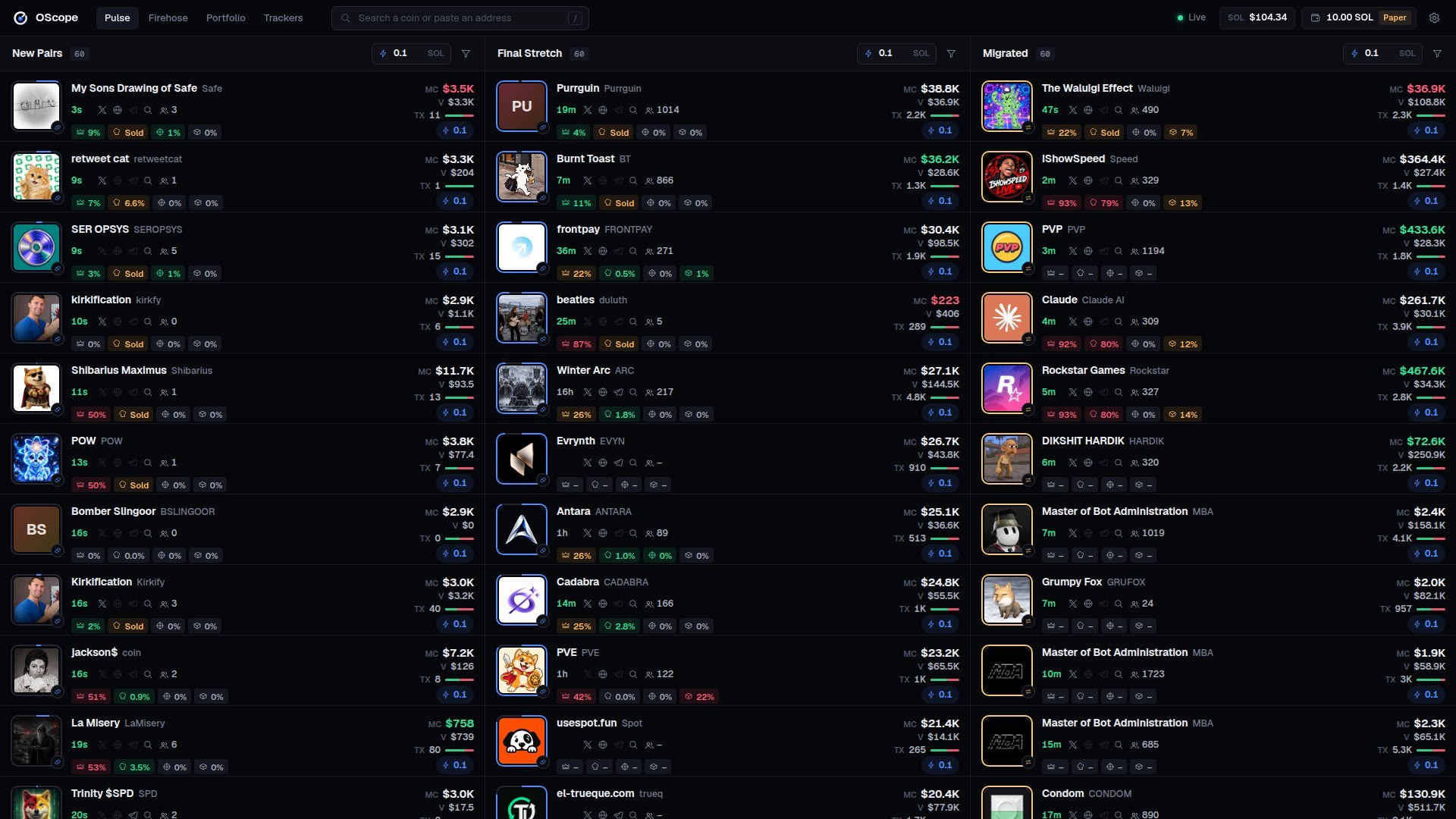
| Pulse | New Pairs, Final Stretch and Migrated, live. Market cap, volume, trades, holders, top 10, dev, sniper and bundle holdings, socials and curve progress on every row. Filters per column. A column holds still while your mouse is on it. |
| Firehose | Every pump.fun and PumpSwap trade the moment it lands, with trades per second, buy share and volume. Filter by size, side and venue. |
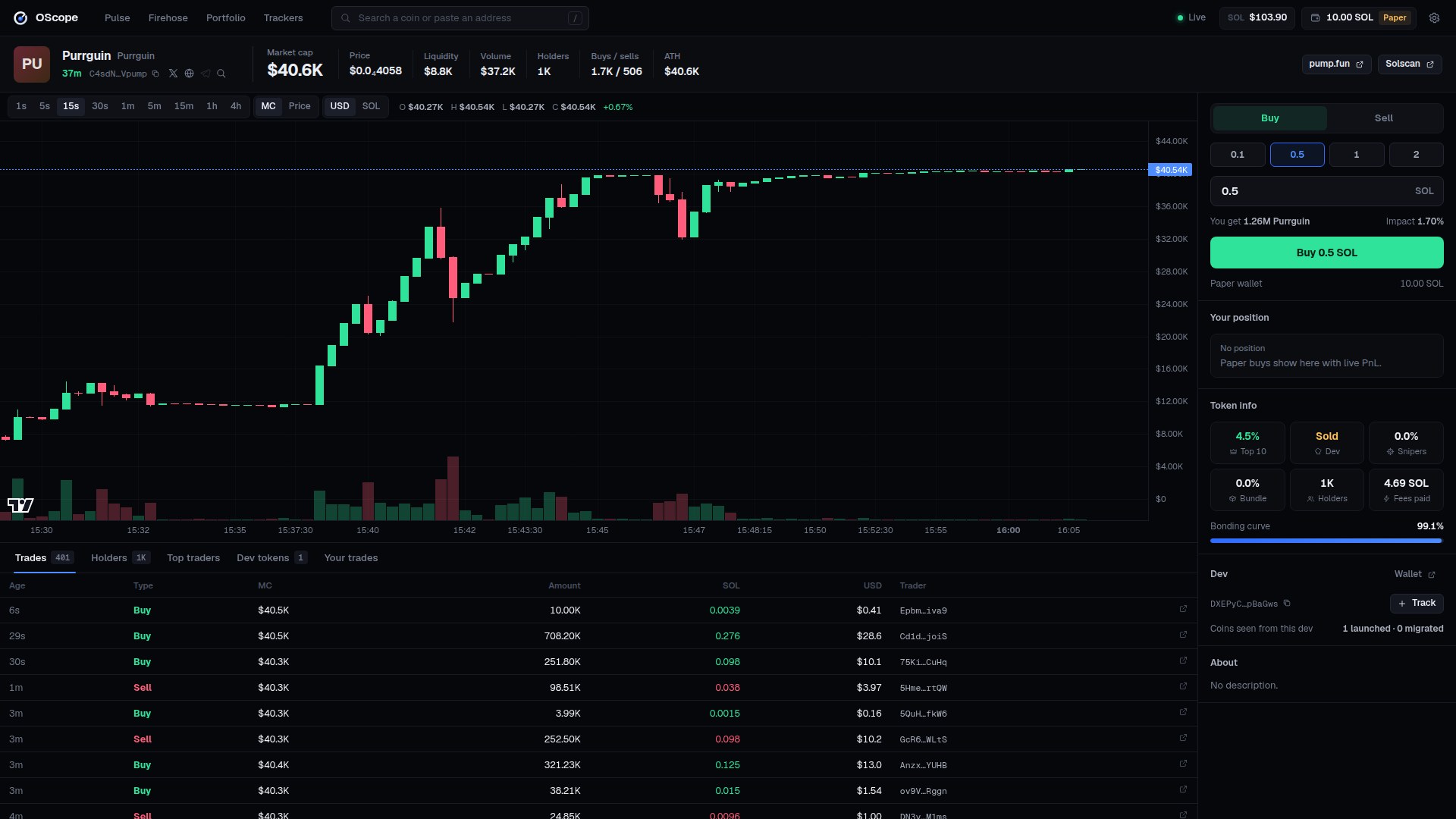
| Coin page | Candles from 1 second to 4 hours, market cap or price, USD or SOL. Live trades, holders, top traders with PnL, the dev's other coins. Marks for the dev, your tracked wallets and your own trades. |
| Paper trading | Quick buy from Pulse, buy and sell on the coin page, live PnL in Portfolio. Fills come from the pool's reserves and fee at the moment you click, so size moves the price like it does on chain. |
| Trackers | Name any wallet and see its trades land, on every page. |
Data
Instant: the PumpApi firehose
OScope starts with no database, no Helius, no API key and no sign-up. It reads the free public stream of PumpApi: one message per pump.fun and PumpSwap transaction, with the pool's reserves and every trader's balance after it. Every number in OScope is built from that:
- price and market cap from the pool reserves
- holders from each trader's balance after their trade
- dev = the wallet that launched the coin, bundle = buys in the launch block, snipers = buys in the next two blocks
- charts from the trades
You see everything from the moment you start. A coin launched after that is complete: every trade, every holder.
A coin launched before shows its live price at once and builds its chart and holders from then on; where a number is
not known yet OScope shows – instead of guessing. What it has seen is saved in data/, so a restart keeps it.
The full picture
A coin's past (its chart since launch, every holder of a week-old coin) needs history, and a live stream has none. Three ways to get it:
| What you do | What you get | Cost | |
|---|---|---|---|
| 1. Start now with PumpApi | Nothing. This is how OScope starts. Leave it running. | Everything from the moment you started. | Free |
| 2. Helius | An API key from helius.dev; OScope asks it for a coin's past trades and full holder list when you open the coin. | The whole history of any coin, on demand. | Free plan for light use |
| 3. Your own database + backfill | Record the stream into a database, load past days once, start OScope from it. | Everything, for every coin, and it is yours. | Disk space and setup |
2 and 3 are not built in yet. History only has to be handed to the same function the live stream uses, and AGENTS.md describes exactly how. Ask your AI: "Add a Helius backfill to OScope. Read AGENTS.md, section Adding history."
The firehose for your own tools
PumpApi allows only a couple of connections per internet address. OScope opens one and passes it on, so your own bots and scripts read the same stream without opening another:
ws://localhost:3000/firehose                      every message
ws://localhost:3000/firehose?pools=pump,pump-amm  only pump.fun and PumpSwap
import WebSocket from 'ws';
const ws = new WebSocket('ws://localhost:3000/firehose?pools=pump,pump-amm');
ws.on('message', m => {
const t = JSON.parse(m);
if (t.action === 'buy') console.log(t.symbol, t.quoteAmount, 'SOL');
});| Command | What it does |
|---|---|
npm run tape |
Trades scroll by in your terminal. npm run tape -- 1 shows only trades of 1 SOL or more. |
npm run firehose |
The firehose alone, without the page, on ws://127.0.0.1:3100. |
npm run doctor |
Checks Node, the libraries, the port, the stream and the data folder, and says how to fix what is wrong. |
Install by hand
Node.js 18.17 or newer (20+ recommended).
git clone https://git.oscope.trade/oscope.git
cd oscope
npm ci
npm start
Open http://localhost:3000. Something off? npm run doctor.
Settings
OScope needs no settings. To change one, copy .env.example to .env.
| Setting | Default | What it does |
|---|---|---|
PORT |
3000 |
Port of the page. If it is taken and you set nothing, OScope takes the next free one and prints it. |
HOST |
127.0.0.1 |
Only this computer. 0.0.0.0 opens it to your network (no password: trusted networks only). |
FEED_URL |
wss://stream.pumpapi.io/ |
The live stream. Point it at a firehose you run to share one connection. |
FIREHOSE |
on |
off stops passing the stream on at /firehose. |
IPFS_GATEWAYS |
three public gateways | Where coin pictures kept on IPFS are fetched from. |
DATA_DIR |
data |
Where OScope keeps what it saw between runs. |
STRETCH_AT |
60 |
Curve progress (%) at which a coin moves to Final Stretch. |
NEW_MAX_AGE_MIN |
60 |
Minutes a coin stays in New Pairs. |
LOG_EVERY |
15 |
Seconds between the trade-count lines in the terminal. 0 turns them off. |
Everything you set in the page (paper wallet, tracked wallets, filters, hidden coins) stays in your browser. Settings → Export saves it to a file; Import brings it back.
How it is built
src/
  server.mjs    web server, the page's websocket, the firehose
  feed.mjs      stream connection and SOL price
  store.mjs     coins, trades, candles, holders, the Pulse columns
  meta.mjs      coin pictures and socials, every address checked first
  config.mjs    settings
tools/
  doctor.mjs    npm run doctor
  tape.mjs      npm run tape
  firehose.mjs  npm run firehose
public/
  index.html, css/, js/    the page: plain JavaScript modules, no build step
It uses about 400–500 MB of memory: full detail for the coins you can see or open, a light copy of the rest.
Credits
Charts by TradingView Lightweight Charts (Apache 2.0). Fonts: Geist (SIL Open Font License). Live data: PumpApi.
Not financial advice
OScope shows public market data. Memecoins are extremely risky and most go to zero.